<?xml version="1.0" encoding="utf-8"?>
<feed xmlns="http://www.w3.org/2005/Atom" xml:lang="en">
  <id>https://www.crystae.net/</id>
  <title>Tom Jakubowski</title>
  <updated>2022-11-29T21:58:07-08:00</updated>
  <link href="https://www.crystae.net/feed.xml" rel="self" />
  
  <link href="https://www.crystae.net/" rel="alternate" type="text/html" />
  <generator uri="https://gohugo.io/" version="0.104.0">
    Hugo
  </generator>
  <rights>© Tom Jakubowski</rights>

  
  <entry>
    <id>https://www.crystae.net/posts/zsh-edit-variables-interactively/</id>
    <title>Edit shell variables interactively in zsh</title>
    <published>2022-10-02T14:51:03-07:00</published>
    <updated>2022-11-29T21:58:07-08:00</updated>
    <author><name></name></author>
    <content type="html"><![CDATA[<p>When you write and edit a command to execute in zsh, you&rsquo;re using <a href="https://linux.die.net/man/1/zshzle">zshzle</a>,
its command line editor. zshzle sets up keybindings like <code>&lt;Ctrl-b&gt;</code> to move the
cursor back one character, and <code>&lt;Ctrl-r&gt;</code> to search command history.</p>
<p>In zsh, use zle&rsquo;s <code>vared</code> built-in to quickly set a variable&rsquo;s value
interactively. <code>vared</code> pastes the variable&rsquo;s current value in a command line
ready for you to edit. When you hit <code>&lt;Return&gt;</code>, the line you&rsquo;ve edited is set.
It even works for arrays, like <code>path</code>.</p>
<script id="asciicast-GHYpJIdBrOaLvgOlRABV171aT" src="https://asciinema.org/a/GHYpJIdBrOaLvgOlRABV171aT.js" async>
</script>
<h2 id="references">References:</h2>
<ul>
<li><a href="https://linux.die.net/man/1/zshzle">zshzle(1)</a></li>
</ul>
]]></content>
  </entry>
  
  <entry>
    <id>https://www.crystae.net/posts/minutes-in-a-year/</id>
    <title>Minutes in a Year</title>
    <published>2022-08-11T18:04:05-07:00</published>
    <updated>2022-11-29T21:19:42-08:00</updated>
    <author><name></name></author>
    <content type="html"><![CDATA[<p>How minutes are there in a year?  Thanks to the solar system, it&rsquo;s complicated,
but Google tells us one answer: 525960. That&rsquo;s equal to 8766 hours, or 365.25
24-hour days, which is the average number of minutes in a Julian calendar year.
Google also gives a nice tip: in case 525960 is too long for you to remember,
you can also use this approximation: 526000.</p>
<p>When you just want to do some quick mental math, there&rsquo;s actually an even nicer
approximation: 5e5, or 500000.  &ldquo;But 500000 is a much farther off than 526000&rdquo;,
you might say, and you&rsquo;d be right.  But 5e5, or five hundred thousand, is less
to remember, and when the time comes that you need to compute a closer figure,
you already roughly know the error: it&rsquo;s actually pretty close to 5%. 5e5 times
1.05 is 525000, less than a day under the &ldquo;true&rdquo; value.</p>
<p>So remember this: 5e5 minutes is 5% off, add 960.</p>
]]></content>
  </entry>
  
  <entry>
    <id>https://www.crystae.net/posts/global-find-and-replace-vim/</id>
    <title>Global find and replace in Vim</title>
    <published>2021-07-03T15:10:44-07:00</published>
    <updated>2021-07-03T15:12:03-07:00</updated>
    <author><name></name></author>
    <content type="html"><![CDATA[<p>Use the quickfix list.</p>
<pre tabindex="0"><code>:grep &#39;whatever&#39;
</code></pre><p>Fills the quickfix list with matches.</p>
<p>Be sure and disable anything else which might stomp over the quickfix list,
like ALE. Or, use <code>:lgrep</code> which fills the location list, which is scoped to a
window.</p>
<h2 id="acting-on-the-results">Acting on the results</h2>
<p>Run a command (search and replace, then write) for each file in the quickfix list:</p>
<pre tabindex="0"><code>:cfdo %s/whatever/whomstever/g | w
</code></pre>]]></content>
  </entry>
  
  <entry>
    <id>https://www.crystae.net/posts/python-cli-with-poetry/</id>
    <title>Developing Python CLIs with Poetry</title>
    <published>2020-02-17T16:40:00-08:00</published>
    <updated>2022-08-11T22:30:18-07:00</updated>
    <author><name></name></author>
    <content type="html"><![CDATA[<p><a href="https://python-poetry.org/">Poetry</a> brings a simplified interface to Python&rsquo;s packaging and distribution
system.  It makes all the right things easy to do.</p>
<p>Here&rsquo;s how you use it to develop a new Python CLI project.</p>
<h2 id="getting-started">Getting started</h2>
<p>We&rsquo;ll make a CLI called <code>hello-snake</code>, in a package and project called <code>snake</code>.
First run <code>poetry new</code> to create the project skeleton.</p>
<pre tabindex="0"><code>tom@tomtop 🎪:~/tmp
% poetry new snake
Created package snake in snake
</code></pre><p>The resulting directory tree:</p>
<pre tabindex="0"><code>tom@tomtop 🎪:~/tmp
% tree snake
snake
├── README.rst
├── pyproject.toml
├── snake
│   └── __init__.py
└── tests
    ├── __init__.py
    └── test_snake.py
</code></pre><p>Change to the <code>snake</code> project directory.  Poetry will manage a virtualenv for
the project, tied to the project path and Python version.  Create the
virtualenv and open a pre-activated shell with <code>poetry shell</code>.</p>
<pre tabindex="0"><code>tom@tomtop 🎪:~/tmp
% cd snake
tom@tomtop 🎪:~/tmp/snake
% poetry shell
Creating virtualenv snake--jYlyyG6-py3.8 in /Users/tom/Library/Caches/pypoetry/virtualenvs
Spawning shell within /Users/tom/Library/Caches/pypoetry/virtualenvs/snake--jYlyyG6-py3.8
tom@tomtop 🎪:~/tmp/snake
% . /Users/tom/Library/Caches/pypoetry/virtualenvs/snake--jYlyyG6-py3.8/bin/activate
(snake--jYlyyG6-py3.8) tom@tomtop 🎪:~/tmp/snake
%
</code></pre><p>Our CLI entrypoint will be in the <code>snake.console</code> module.  Create it in
<code>snake/console.py</code>, next to <code>snake/__init__.py</code>, and add a <code>run()</code> function to
serve as entrypoint.</p>
<pre tabindex="0"><code>def run():
    print(&#34;🐍&#34;)
</code></pre><p>Our project will ship a single executable, named <code>hello-snake</code>.  Add it to the
<code>tool.poetry.scripts</code> section of <code>pyproject.toml</code>.</p>
<pre tabindex="0"><code>[tool.poetry.scripts]
hello-snake = &#39;snake.console:run&#39;`
</code></pre><p>This specifies that the program <code>hello-snake</code> executes the function <code>run()</code> in
the module <code>snake.console</code>.</p>
<p>Install the package and its dependencies to the virtualenv.</p>
<pre tabindex="0"><code>(snake--jYlyyG6-py3.8) tom@tomtop 🎪:~/tmp/snake
% poetry install
Updating dependencies
Resolving dependencies... (0.2s)

Writing lock file


Package operations: 9 installs, 0 updates, 0 removals

...
  - Installing snake (0.1.0)
</code></pre><p>You can now run the new CLI as <code>hello-snake</code>.</p>
<pre tabindex="0"><code>(snake--jYlyyG6-py3.8) tom@tomtop 🎪:~/tmp/snake
% hello-snake
🐍
</code></pre><p>The <code>snake</code> package is installed to the virtualenv as &ldquo;editable&rdquo;, so that
changes made in the project source directory are reflected immediately whenever
you run <code>hello-snake</code>.  To try that out, let&rsquo;s make the snake a little angrier.
Update <code>console.py</code>.`</p>
<pre tabindex="0"><code>def run():
    print(&#34;🐍 tsssssss&#34;)
</code></pre><p>And <code>hello-snake</code> includes the change without having to re-install our package:</p>
<pre tabindex="0"><code>(snake--jYlyyG6-py3.8) tom@tomtop 🎪:~/tmp/snake
% hello-snake
🐍 tsssssss
</code></pre><p>All of this should continue to work the next time you open a <code>poetry shell</code> for
this project.</p>
<h2 id="packaging-and-distribution">Packaging and distribution</h2>
<p>It&rsquo;s easy to share and distribute your new CLI package.  Use <code>poetry build</code> to
create tarball and <a href="https://pythonwheels.com/">wheel</a> packages under <code>dist/</code>.</p>
<pre tabindex="0"><code>tom@tomtop 🎪:~/tmp/snake
% poetry build
Building snake (0.1.0)
 - Building sdist
 - Built snake-0.1.0.tar.gz

 - Building wheel
 - Built snake-0.1.0-py3-none-any.whl
</code></pre><p>The wheel file can be distributed to users, to be installed to their global
Python environment:</p>
<pre tabindex="0"><code>tom@tomtop 🎪:~/tmp/snake
% pip install --user dist/snake-0.1.0-py3-none-any.whl
Processing ./dist/snake-0.1.0-py3-none-any.whl
Installing collected packages: snake
Successfully installed snake-0.1.0
WARNING: You are using pip version 19.2.3, however version 20.0.2 is available.
You should consider upgrading via the &#39;pip install --upgrade pip&#39; command.
</code></pre><p>Once the wheel is installed, the users can run <code>hello-snake</code>.</p>
<pre tabindex="0"><code>tom@tomtop 🎪:~/tmp/snake
% hello-snake
🐍 tsssssss
</code></pre>]]></content>
  </entry>
  
  <entry>
    <id>https://www.crystae.net/posts/two-shebang-papercuts/</id>
    <title>Two shebang papercuts</title>
    <published>2019-11-08T09:11:46+00:00</published>
    <updated>2022-08-11T23:10:13-07:00</updated>
    <author><name></name></author>
    <content type="html"><![CDATA[<p>You&rsquo;ve written a Ruby script on your Mac.  The script demands great
performance, so you add <code>--enable=jit</code> to its <a href="https://en.wikipedia.org/wiki/Shebang_(Unix)">shebang</a>:</p>
<div class="highlight"><pre tabindex="0" style="color:#f8f8f2;background-color:#272822;-moz-tab-size:4;-o-tab-size:4;tab-size:4;"><code class="language-ruby" data-lang="ruby"><span style="display:flex;"><span><span style="color:#75715e">#!/usr/bin/env ruby --enable=jit</span>
</span></span><span style="display:flex;"><span>
</span></span><span style="display:flex;"><span>print <span style="color:#e6db74">&#34;Hello, world!&#34;</span>
</span></span></code></pre></div><p>You test on your Mac and the program greets everybody in record time.  Ship it!</p>
<p>Some time later, a user reports a problem.  When they run the script, it seems
rather slow; in fact, they&rsquo;ve waited for hours and no one has been greeted.</p>
<p>The script still works (and it&rsquo;s fast!) on your machine, so you ask the user
about their environment.  One difference stands out: they&rsquo;re using Linux.  So
you spin up a Linux box and try the script.  Sure enough, it seems stuck.  You
reach for <a href="https://strace.io/"><code>strace</code></a>, and see the same spew looping ad nauseam:</p>
<pre tabindex="0"><code>you@yourbox:~$ sudo strace ./hello
execve(&#34;./hello&#34;, [&#34;./hello&#34;], 0x7ffe721b38b0 /* 52 vars */) = 0
brk(NULL)                               = 0x55b53fddf000
arch_prctl(0x3001 /* ARCH_??? */, 0x7fff6a434040) = -1 EINVAL (Invalid argument)
access(&#34;/etc/ld.so.preload&#34;, R_OK)      = -1 ENOENT (No such file or directory)
openat(AT_FDCWD, &#34;/etc/ld.so.cache&#34;, O_RDONLY|O_CLOEXEC) = 3
fstat(3, {st_mode=S_IFREG|0644, st_size=211342, ...}) = 0
mmap(NULL, 211342, PROT_READ, MAP_PRIVATE, 3, 0) = 0x7f4088423000
close(3)                                = 0
openat(AT_FDCWD, &#34;/usr/lib/libc.so.6&#34;, O_RDONLY|O_CLOEXEC) = 3
read(3, &#34;\177ELF\2\1\1\3\0\0\0\0\0\0\0\0\3\0&gt;\0\1\0\0\0`r\2\0\0\0\0\0&#34;..., 832) = 832
lseek(3, 64, SEEK_SET)                  = 64
read(3, &#34;\6\0\0\0\4\0\0\0@\0\0\0\0\0\0\0@\0\0\0\0\0\0\0@\0\0\0\0\0\0\0&#34;..., 784) = 784
lseek(3, 848, SEEK_SET)                 = 848
read(3, &#34;\4\0\0\0\20\0\0\0\5\0\0\0GNU\0\2\0\0\300\4\0\0\0\3\0\0\0\0\0\0\0&#34;, 32) = 32
lseek(3, 880, SEEK_SET)                 = 880
read(3, &#34;\4\0\0\0\24\0\0\0\3\0\0\0GNU\0003\321\363P\3617(e\35t\335*V\272\321\344&#34;..., 68) = 68
fstat(3, {st_mode=S_IFREG|0755, st_size=2149496, ...}) = 0
mmap(NULL, 8192, PROT_READ|PROT_WRITE, MAP_PRIVATE|MAP_ANONYMOUS, -1, 0) = 0x7f4088421000
lseek(3, 64, SEEK_SET)                  = 64
read(3, &#34;\6\0\0\0\4\0\0\0@\0\0\0\0\0\0\0@\0\0\0\0\0\0\0@\0\0\0\0\0\0\0&#34;..., 784) = 784
lseek(3, 848, SEEK_SET)                 = 848
read(3, &#34;\4\0\0\0\20\0\0\0\5\0\0\0GNU\0\2\0\0\300\4\0\0\0\3\0\0\0\0\0\0\0&#34;, 32) = 32
lseek(3, 880, SEEK_SET)                 = 880
read(3, &#34;\4\0\0\0\24\0\0\0\3\0\0\0GNU\0003\321\363P\3617(e\35t\335*V\272\321\344&#34;..., 68) = 68
mmap(NULL, 1860536, PROT_READ, MAP_PRIVATE|MAP_DENYWRITE, 3, 0) = 0x7f408825a000
mprotect(0x7f408827f000, 1671168, PROT_NONE) = 0
mmap(0x7f408827f000, 1363968, PROT_READ|PROT_EXEC, MAP_PRIVATE|MAP_FIXED|MAP_DENYWRITE, 3, 0x25000) = 0x7f408827f000
mmap(0x7f40883cc000, 303104, PROT_READ, MAP_PRIVATE|MAP_FIXED|MAP_DENYWRITE, 3, 0x172000) = 0x7f40883cc000
mmap(0x7f4088417000, 24576, PROT_READ|PROT_WRITE, MAP_PRIVATE|MAP_FIXED|MAP_DENYWRITE, 3, 0x1bc000) = 0x7f4088417000
mmap(0x7f408841d000, 13240, PROT_READ|PROT_WRITE, MAP_PRIVATE|MAP_FIXED|MAP_ANONYMOUS, -1, 0) = 0x7f408841d000
close(3)                                = 0
arch_prctl(ARCH_SET_FS, 0x7f4088422580) = 0
mprotect(0x7f4088417000, 12288, PROT_READ) = 0
mprotect(0x55b53f654000, 4096, PROT_READ) = 0
mprotect(0x7f4088481000, 4096, PROT_READ) = 0
munmap(0x7f4088423000, 211342)          = 0
brk(NULL)                               = 0x55b53fddf000
brk(0x55b53fe00000)                     = 0x55b53fe00000
openat(AT_FDCWD, &#34;/usr/lib/locale/locale-archive&#34;, O_RDONLY|O_CLOEXEC) = 3
fstat(3, {st_mode=S_IFREG|0644, st_size=3035216, ...}) = 0
mmap(NULL, 3035216, PROT_READ, MAP_PRIVATE, 3, 0) = 0x7f4087f74000
close(3)                                = 0
execve(&#34;./hello&#34;, [&#34;./hello&#34;], 0x7ffe721b38b0 /* 52 vars */) = 0
brk(NULL)                               = 0x55b53fddf000
arch_prctl(0x3001 /* ARCH_??? */, 0x7fff6a434040) = -1 EINVAL (Invalid argument)
...
</code></pre><p>What&rsquo;s going on?  The script is just <code>exec</code>-ing itself in a seemingly infinite
loop, and not really doing anything else.  Why?</p>
<p>It turns out this comes from combining two papercuts, one which applies to
shebangs in general, and another which applies to any which invoke
<code>/usr/bin/env</code>.</p>
<h2 id="the-multiple-argument-shebang-papercut">the multiple argument shebang papercut</h2>
<p>You can think of the shebang <code>#!/usr/bin/env ruby --enable=jit</code> as having two parts:</p>
<ul>
<li>The &ldquo;interpreter name&rdquo;, <code>/usr/bin/env</code>, which is a path to the script&rsquo;s
interpreter</li>
<li>The remainder, <code>ruby --enable=jit</code></li>
</ul>
<p>Among other differences in shebangs, Linux and macOS treat the remainder
differently.  Linux parses the remainder into exactly one argument.  In our
<code>./hello</code> example, Linux parses the shebang&rsquo;s remainder to <code>&quot;ruby --enable=jit&quot;</code>, combines it with the user&rsquo;s arguments <code>{&quot;./hello&quot;}</code>, and
executes <code>&quot;/usr/bin/env&quot;</code> with arguments <code>{&quot;/usr/bin/env&quot;, &quot;ruby --enable=jit&quot;, &quot;./hello&quot;}</code>.</p>
<p>macOS splits the remainder into several arguments if there are spaces.  For
<code>./hello</code>, macOS parses the remainder to <code>{&quot;ruby&quot;, &quot;--enable=jit&quot;}</code> and
executes <code>&quot;/usr/bin/env&quot;</code> with arguments <code>{&quot;env&quot;, &quot;ruby&quot;, &quot;--enable=jit&quot;, &quot;./hello&quot;}</code>.</p>
<p>It seems like the script would fail on Linux with this shebang, because it&rsquo;s
not asking <code>env</code> to find and run <code>ruby</code>.  But it&rsquo;s not saying something like,
<code>program not found: ruby --enable=jit</code>, it&rsquo;s hanging in that loop.  Something
else is afoot.</p>
<h2 id="the-usrbinenv-shebang-papercut">the #!/usr/bin/env shebang papercut</h2>
<p>The first papercut doesn&rsquo;t fully explain this loopy behavior.  Another
paper-sharp shebang, which also tries to pass two arguments to <code>/usr/bin/env</code>,
fails differently on Linux:</p>
<div class="highlight"><pre tabindex="0" style="color:#f8f8f2;background-color:#272822;-moz-tab-size:4;-o-tab-size:4;tab-size:4;"><code class="language-ruby" data-lang="ruby"><span style="display:flex;"><span><span style="color:#75715e">#!/usr/bin/env ruby --verbose</span>
</span></span><span style="display:flex;"><span>
</span></span><span style="display:flex;"><span>echo <span style="color:#e6db74">&#34;Goodbye, world&#34;</span>
</span></span></code></pre></div><pre tabindex="0"><code>you@yourbox:~$ ./goodbye
/usr/bin/env: ‘ruby --verbose’: No such file or directory
</code></pre><p>The difference is in the <code>=</code> character.  Besides finding the first interpreter
on a user&rsquo;s <code>PATH</code>, <code>env</code> has another use: to &ldquo;run a program in a modified
environment&rdquo;.  One way it does this is to take arguments of the form
<code>VARIABLE=VALUE</code> before the program and its arguments, and set those
environment variables in the executed program&rsquo;s process.  For instance:</p>
<div class="highlight"><pre tabindex="0" style="color:#f8f8f2;background-color:#272822;-moz-tab-size:4;-o-tab-size:4;tab-size:4;"><code class="language-bash" data-lang="bash"><span style="display:flex;"><span>you@yourbox:~$ env DISPLAY<span style="color:#f92672">=</span>:0 xeyes -fg dodgerblue
</span></span></code></pre></div><p>executes <code>{&quot;xeyes&quot;, &quot;-fg&quot;, &quot;dodgerblue&quot;}</code> with the shell&rsquo;s environment, plus
the environment variable <code>&quot;DISPLAY&quot;</code> set to <code>&quot;:0&quot;</code>.</p>
<p>Combining these papercuts, when Linux comes to execute <code>./hello</code>:</p>
<ol>
<li>An <code>exec</code>-family function reads <code>&quot;./hello&quot;</code>&rsquo;s contents and parses the
shebang into <code>{&quot;/usr/bin/env&quot;, &quot;ruby --enable=jit&quot;}</code>.</li>
<li>The parsed shebang is combined with the <code>argv</code> passed to <code>exec*()</code> to
ultimately execute <code>{&quot;/usr/bin/env&quot;, &quot;ruby --enable=jit&quot;, &quot;./hello&quot;}</code>.</li>
<li><code>env</code> parses its arguments, sets the environment variable <code>&quot;ruby --enable&quot;</code> to the value <code>&quot;jit&quot;</code> and executes the program <code>&quot;./hello&quot;</code>.</li>
<li><code>GOTO 1</code></li>
</ol>
<p><code>./goodbye</code> fails differently because <code>env</code> interprets the argument <code>ruby --verbose</code> as the program to run, since there&rsquo;s no <code>=</code> character in it.</p>
<h2 id="a-solution--s">a solution: -S</h2>
<p>Fortunately, modern versions of <code>env</code> have a solution.  macOS and FreeBSD
support the <code>-S</code> option, which does, quote the macOS manual:</p>
<pre tabindex="0"><code>   -S string
           Split apart the given string into multiple strings, and process each of the
           resulting strings as separate arguments to the env utility.  The -S option
           recognizes some special character escape sequences and also supports environment-
           variable substitution, as described below.
</code></pre><p>On Linux, GNU&rsquo;s coreutils added the same flag to <code>env</code> in version <a href="https://savannah.gnu.org/forum/forum.php?forum_id=9187">8.30</a>,
released July 2018.</p>
<p>So you can write a fancy, optionful shebang like:</p>
<div class="highlight"><pre tabindex="0" style="color:#f8f8f2;background-color:#272822;-moz-tab-size:4;-o-tab-size:4;tab-size:4;"><code class="language-ruby" data-lang="ruby"><span style="display:flex;"><span><span style="color:#75715e">#!/usr/bin/env -S ruby --enable=jit --verbose</span>
</span></span><span style="display:flex;"><span>
</span></span><span style="display:flex;"><span>puts <span style="color:#e6db74">&#34;Hello, world!&#34;</span>
</span></span></code></pre></div><p>And <code>./hello</code> will execute what you wanted.</p>
<h2 id="references">references</h2>
<p>Andries E. Brouwer posted a good <a href="https://homepages.cwi.nl/~aeb/std/hashexclam-1.html">writeup</a> of shebang behavior on many
unix-ish platforms.</p>
]]></content>
  </entry>
  
  <entry>
    <id>https://www.crystae.net/posts/activating-prefrontal-cortex/</id>
    <title>[activating prefrontal cortex]</title>
    <published>2019-09-14T00:02:00-07:00</published>
    <updated>2022-08-11T22:30:18-07:00</updated>
    <author><name></name></author>
    <content type="html"><![CDATA[<p>Since last weekend, I&rsquo;d been meaning to write here.  I have a few ideas to
write about—some of them I&rsquo;ve even outlined and sketched diagrams for—but I
haven&rsquo;t actually gotten to writing anything.  It&rsquo;s bothered me all week.</p>
<p>While stuck in bed reading my phone Friday morning, a <a href="https://news.ycombinator.com/item?id=20962295">Hacker News
comment</a> caught my eye.  Quoting user stevewodil:</p>
<blockquote>
<p>If you&rsquo;re having trouble getting out of bed, you can try using the 5 second
rule to break your brain&rsquo;s patterns and activate the prefrontal cortex.
Basically you count down from 5 out loud (saying the numbers aloud is
important) and at 1 you just jump out of that damn bed like NASA launching a
rocket.</p>
</blockquote>
<p>Not too convincing, but I had to get up, and felt trapped in a very familiar
check Twitter-HackerNews-Lobsters-Fangraphs morning cycle of avoidance.  It
probably couldn&rsquo;t hurt to try to &ldquo;break my brain&rsquo;s patterns&rdquo; this way.</p>
<p>It turns out that, after a deliberate, five second countdown, out loud, I did
indeed simply rocket out of bed.  The trick seemed to work on me.</p>
<p>I thought that maybe a similar trick could work to break the brain pattern
that&rsquo;s making me avoid writing: count down from five and make a post.  Post
anything, just to unblock the process.  So here comes a
math&rsquo;s<sup id="fnref:1"><a href="#fn:1" class="footnote-ref" role="doc-noteref">1</a></sup> shitpost.</p>
<p>When it comes to skateboarding brand Supreme, with the poor quality of their
products, if you ask me, they should call it, <a href="https://en.wikipedia.org/wiki/Infimum_and_supremum"><img src="/images/infime.png" alt="Infime"></a>.</p>
<p>Thank you.</p>
<div class="footnotes" role="doc-endnotes">
<hr>
<ol>
<li id="fn:1">
<p>mathematics, as bo&rsquo;s&rsquo;n is to boatswain&#160;<a href="#fnref:1" class="footnote-backref" role="doc-backlink">&#x21a9;&#xfe0e;</a></p>
</li>
</ol>
</div>
]]></content>
  </entry>
  
  <entry>
    <id>https://www.crystae.net/posts/one-thing-i-love-about-neovim/</id>
    <title>Healthchecking in Neovim</title>
    <published>2019-04-20T13:54:23-07:00</published>
    <updated>2022-08-11T22:30:18-07:00</updated>
    <author><name></name></author>
    <content type="html"><![CDATA[<p>I like to use a few text editor plugins for finnicky things like &ldquo;smart&rdquo; code
completion.  These plugins often rely on some assumptions about the state of
the computer outside of the editor: they might need a utility program installed
(such as <a href="https://github.com/rust-lang/rls">rls</a>), or a configuration file to exist in a certain location, or a
certain environment variable to be set.</p>
<p>When the computer&rsquo;s state is misconfigured, editor plugins may fail.  Their
failure may be catastrophic or rather subtle.  System upgrades and changes
irregularly trigger such problems, breaking editor plugins unexpectedly, and
forcing the user to troubleshoot.</p>
<p>Neovim&rsquo;s <code>:checkhealth</code> command is a big help.  The editor and its plugins can
define certain tests, called &ldquo;health checks&rdquo;, which examine the user&rsquo;s
environment for programs, configuration files, and the like.  When each test
succeeds or fails, its results are logged to a window for the user to read.</p>
<p>A failed health check represents a failed expectation about the development
environment.  It might also spell out the logic used by the health check to
determine that the expectation failed.</p>
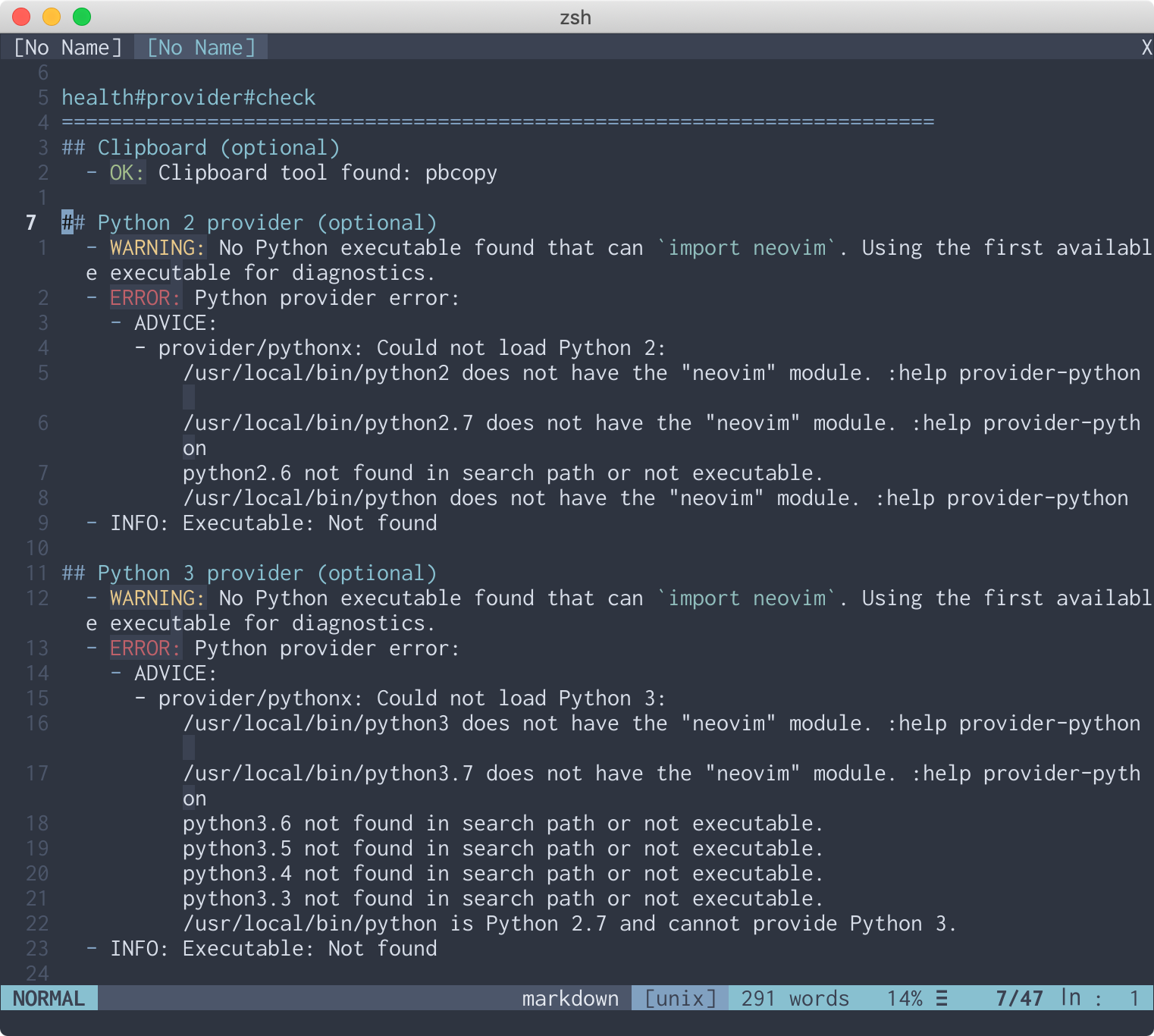
<p>For example, suppose you decide to try out Neovim&rsquo;s python2 integration.  So
you read the help file and type in one of the examples, but are greeted
with an error message.</p>
<pre tabindex="0"><code>:py print(sys.version)
E319: No &#34;python&#34; provider found.  Run &#34;:checkhealth provider&#34;
</code></pre><p>You execute that command, which makes Neovim run health checks for its
&ldquo;provider&rdquo; components.</p>
<p><img src="/images/neovim-checkhealth-bad.png" alt="screenshot of neovim showing mixed health check results"></p>
<p>Neovim&rsquo;s Python 2 provider is in a degraded state.  Apparently, none of the
python2 interpreters that were found could import the neovim module.  Like the
message suggests, you read <code>:help provider-python</code>.</p>
<pre tabindex="0"><code>...
- For Python 2 plugins, make sure Python 2.7 is available in your $PATH, then
  install the package systemwide:
    sudo pip2 install --upgrade pynvim
  or for the current user:
    pip2 install --user --upgrade pynvim
...
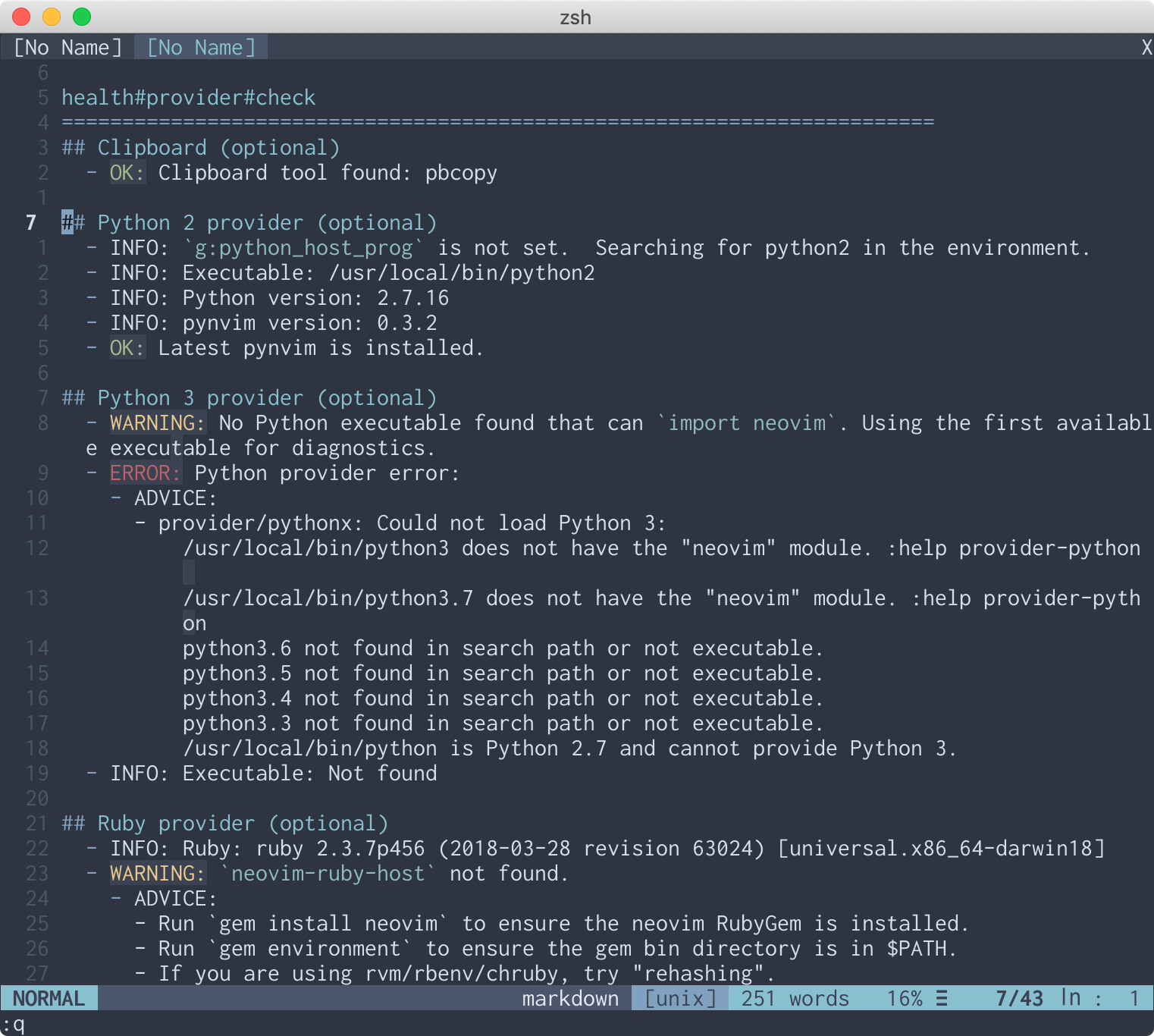
</code></pre><p>You try that <code>pip2</code> command in another terminal, and then run <code>:checkhealth provider</code> again.</p>
<p><img src="/images/neovim-checkhealth-good.png" alt="screenshot of neovim showing better health check results"></p>
<p>All looks good, so you try the <code>:py</code> command again:</p>
<pre tabindex="0"><code>:py print(sys.version)
2.7.16 (default, Apr 12 2019, 15:32:40)
[GCC 4.2.1 Compatible Apple LLVM 10.0.1 (clang-1001.0.46.3)]
Press ENTER or type command to continue
</code></pre><p>It works!  Now you can get your Python on in the editor.</p>
<p>I think what makes this experience so nice is that this health check plainly
lists three key sets of facts: the preconditions for the system to work
correctly; the system&rsquo;s current status with respect to those preconditions; and
the logic used to determine that status.  The plugin is capable of diagnosing
its own issues and explaining the problem in words.  This is a massive
improvement over, say, making sense of a stack trace in what&rsquo;s likely someone
else&rsquo;s code.</p>
<p>For more on health checks, see Neovim&rsquo;s <a href="https://neovim.io/doc/user/pi_health.html">documentation</a>, or <code>:help pi_health</code>.</p>
]]></content>
  </entry>
  
</feed>